
About Content Provided by Nikon
Nikon has prepared a cloud service, computer software, smart device apps, and other content for you to further enjoy photos. By using this content, you can share camera settings related to finishing of photos you want to take, adjust and process photos you have taken, transfer photos to computers and smart devices automatically, and more.
Cloud Service (0 Cloud Service)
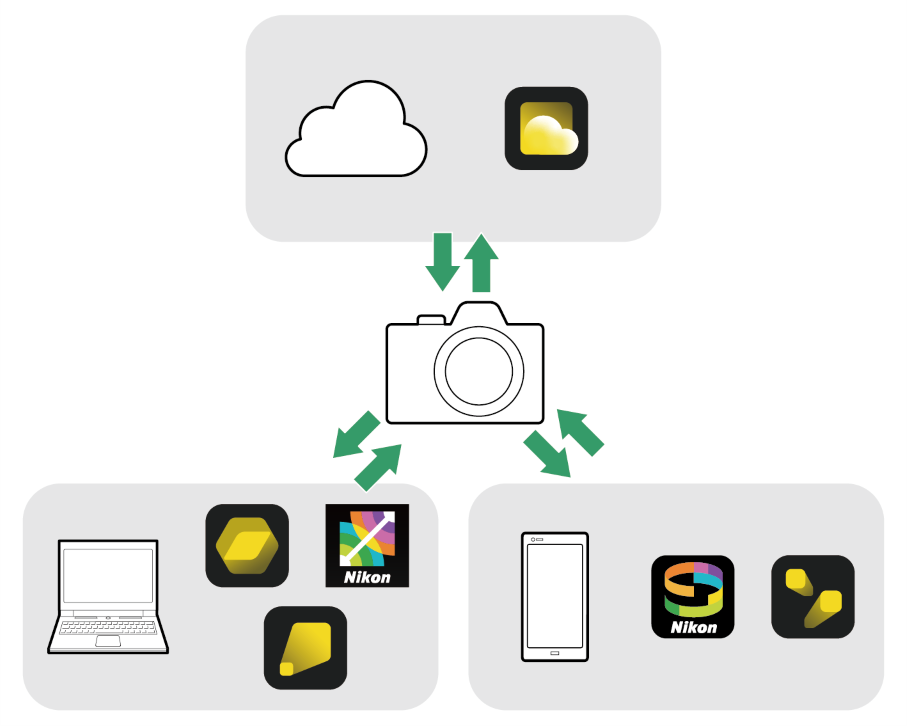
Computer Software (0 Computer Software)
Smartphone (Tablet) Apps (0 Smartphone (Tablet) Apps)
Recommended Services and Apps
For the latest information, visit the Nikon website.
Nikon Imaging Cloud
Nikon Imaging Cloud is a cloud service that provides following services.
- Image transfer: Upload images shot with the camera to Nikon Imaging Cloud and send them to external online storage.
- Imaging recipe: Save image shooting data as a recipe. Create your own recipes or select from “public recipes.”
- Providing Picture Controls: Download Picture Controls from Nikon Imaging Cloud and import them to the camera.
- Firmware update: Download firmware directly to the camera from Nikon Imaging Cloud.

To access Nikon Imaging Cloud from a computer or smart device, either scan the QR code or enter the following URL into a web browser.
- You can also check the access QR code and URL by [Nikon Imaging Cloud] > [About Nikon Imaging Cloud] in the camera’s network menu.
SnapBridge
SnapBridge is an app that connects a smart device and camera wirelessly to enable features such as downloading pictures to the smart device and remote shooting.

The SnapBridge app can be downloaded from the Apple App Store® or on Google Play™.


NX Studio
Use NX Studio software to view and edit photos shot with Nikon digital cameras.
https://downloadcenter.nikonimglib.com/en/products/564/NX_Studio.html

For other applications and software, see the following pages:
- Smartphone (Tablet) Apps (0 Smartphone (Tablet) Apps)
- Computer Software (0 Computer Software)