عربي
Български
Dansk
Deutsch
Ελληνικά
English
Español
Eesti
Suomi
Français
हिन्दी
Magyar
Indonesia
Italiano
日本語
Қазақ
한글
Lietuvių
Latviski
Nederlands
Norsk
Polski
Português
Română
Русский
Slovenščina
Српски
Svenska
ภาษาไทย
Türkçe
简体中文
繁體中文
D780 Online Manual HOME
Table of Contents
Package Contents
Menu List
For Your Safety
Getting to Know the Camera
First Steps
Basic Photography and Playback
Camera Controls
Shooting Settings
Options for Movie Recording and Editing
Other Shooting Options
Playback
Connecting to Computers and TVs
Network Connections
On-Camera Flash Photography
Remote Flash Photography
Menu Guide
Troubleshooting
Technical Notes
Kit Lens Manual
Watch and learn! Digitutor
An easy-to-understand resource featuring video tutorials, sample images, and other materials introducing how to configure and use the D780 for taking beautiful pictures.
D780 Online Manual Menu Guide
D The Playback Menu: Managing Images
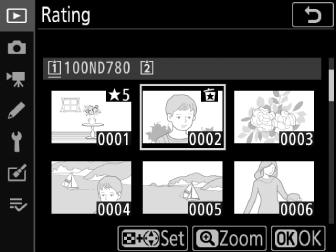
Rating
Rate pictures.
Highlight pictures using the multi selector.
Hold the W (Y ) button and press 1 or 3 to choose a rating of from zero to five stars, or select d to mark the picture as a candidate for later deletion.
To view the highlighted picture full screen, press and hold the X (T ) button.
Press J to save changes.
D780 Online Manual HOME
Table of Contents
Package Contents
Menu List
For Your Safety
Getting to Know the Camera
First Steps
Basic Photography and Playback
Camera Controls
Shooting Settings
Options for Movie Recording and Editing
Other Shooting Options
Playback
Connecting to Computers and TVs
Network Connections
On-Camera Flash Photography
Remote Flash Photography
Menu Guide
Troubleshooting
Technical Notes
Kit Lens Manual
Watch and learn! Digitutor
An easy-to-understand resource featuring video tutorials, sample images, and other materials introducing how to configure and use the D780 for taking beautiful pictures.